<?xml version="1.0" encoding="utf-8"?>
<feed xmlns="http://www.w3.org/2005/Atom">

  <title><![CDATA[Flavio Castelli]]></title>
  <link href="http://flavio.castelli.name/atom.xml" rel="self"/>
  <link href="http://flavio.castelli.name/"/>
  <updated>2013-04-12T22:16:36+02:00</updated>
  <id>http://flavio.castelli.name/</id>
  <author>
    <name><![CDATA[Flavio Castelli]]></name>
    
  </author>
  <generator uri="http://octopress.org/">Octopress</generator>

  
  <entry>
    <title type="html"><![CDATA[Docker and openSUSE: a container full of Geekos]]></title>
    <link href="http://flavio.castelli.name/2013/04/12/docker-and-opensuse/"/>
    <updated>2013-04-12T14:45:00+02:00</updated>
    <id>http://flavio.castelli.name/2013/04/12/docker-and-opensuse</id>
    <content type="html"><![CDATA[<p><a href="http://hackweek.suse.com/">SUSE&#8217;s Hackweek #9</a> is over. It has
been an awesome week during which I worked hard to make <a href="http://www.docker.io">docker</a>
a first class citizen on <a href="http://www.opensuse.org/">openSUSE</a>. I also spent
some time working on an openSUSE container that could be used by docker&#8217;s users.</p>

<p>The project has been tracked on <a href="https://github.com/SUSE/hackweek/wiki/docker.io-and-openSUSE">this</a>
page of hackweek&#8217;s wiki, this is a detailed report of what I achieved.</p>

<h2>Installing docker on openSUSE 12.3</h2>

<p>Docker has been packaged inside of <a href="https://build.opensuse.org/project/show?project=home%3Aflavio_castelli%3Adocker">this</a>
OBS project.</p>

<p>So installing it requires just two commands:</p>

<figure class='code'><div class="highlight"><table><tr><td class="gutter"><pre class="line-numbers"><span class='line-number'>1</span>
<span class='line-number'>2</span>
</pre></td><td class='code'><pre><code class=''><span class='line'>sudo zypper ar http://download.opensuse.org/repositories/home:/flavio_castelli:/docker/openSUSE_12.3 docker
</span><span class='line'>sudo zypper in docker</span></code></pre></td></tr></table></div></figure>


<p>There&#8217;s also a <a href="http://software.opensuse.org/ymp/home:flavio_castelli:docker/openSUSE_12.3/docker.ymp?base=openSUSE%3A12.3&amp;query=docker">1 Click Install</a>
for the lazy ones :)</p>

<p>Zypper will install docker and its dependencies which are:</p>

<ul>
<li><code>lxc</code>: docker&#8217;s &#8220;magic&#8221; is built on top of <a href="http://lxc.sourceforge.net/">LXC</a>.</li>
<li><code>bridge-utils</code>: is used to setup the bridge interface used by docker&#8217;s
containers.</li>
<li><code>dnsmasq</code>: is used to start the dhcp server used by the containers.</li>
<li><code>iptables</code>: is used to get containers&#8217; networking work.</li>
<li><code>bsdtar</code>: is used by docker to compress/extract the containers.</li>
<li><a href="http://aufs.sourceforge.net/">aufs3</a> kernel module: is used by docker to
track the changes made to the containers.</li>
</ul>


<p>The <code>aufs3</code> kernel module is <strong>not</strong> part of the official kernel and is <strong>not</strong>
available on the official repositories. Hence adding docker will trigger the
<strong>installation of a new kernel package</strong> on your machine.</p>

<p>Both the kernel and the aufs3 packages are going to be installed from the
<em>home:flavio_castelli:docker</em> repository but they
are in fact links to the packages created by <a href="https://build.opensuse.org/home?user=-miska-">Michal Hrusecky</a>
inside of his <a href="https://build.opensuse.org/package/show?package=aufs3&amp;project=home%3A-miska-%3Aaufs">aufs project</a>
on OBS.</p>

<p><strong>Note well:</strong> docker works only on 64bit hosts. That&#8217;s why there are no 32bit
packages.</p>

<h2>Docker appliance</h2>

<p>If you don&#8217;t want to install docker on your system or you are just curious and
want to jump straight into action there&#8217;s a <a href="http://susestudio.com">SUSE Studio</a>
appliance ready for you. You can find it <a href="http://susestudio.com/a/CZ0T0D/docker">here</a>.</p>

<p>If you are not familiar with SUSE Gallery let me tell you two things about it:</p>

<ul>
<li>you can download the appliance on your computer and play with it or&#8230;</li>
<li>you can clone the appliance on SUSE Studio and customize it even further or&#8230;</li>
<li>you can test the appliance from your browser using SUSE Studio&#8217;s Testdrive
feature (no SUSE Studio account required!).</li>
</ul>


<p>The latter option is really cool, because it will allow you to play with docker
immediately. There&#8217;s just one thing to keep in mind about Testdrive: outgoing
connections are disabled, so you won&#8217;t be able to install new stuff (or download
new docker images). Fortunately this appliance comes with the busybox container
bundled, so you will be able to play a bit with docker.</p>

<h2>Running docker</h2>

<p>The docker daemon must be running in order to use your containers. The openSUSE
package comes with a init script which can be used to manage it.</p>

<p>The script is <code>/etc/init.d/docker</code>, but there&#8217;s also the usual symbolic link
called <code>/usr/sbin/rcdocker</code>.</p>

<p>To start the docker daemon just type:</p>

<figure class='code'><div class="highlight"><table><tr><td class="gutter"><pre class="line-numbers"><span class='line-number'>1</span>
</pre></td><td class='code'><pre><code class=''><span class='line'>sudo /usr/sbin/rcdocker start</span></code></pre></td></tr></table></div></figure>


<p>This will trigger the following actions:</p>

<ol>
<li>The <code>docker0</code> bridge interface is created. This interface is bridged
with <code>eth0</code>.</li>
<li>A <code>dnsmasq</code> instance listening on the <code>docker0</code> interface is started.</li>
<li>IP forwarding and IP masquerading are enabled.</li>
<li>Docker daemon is started.</li>
</ol>


<p>All the containers will get an IP on the <code>10.0.3.0/24</code> network.</p>

<h2>Playing with docker</h2>

<p>Now is time to play with docker.</p>

<p>First of all you need to download an image: <code>docker pull base</code></p>

<p>This will fetch the official Ubuntu-based image created by the
<a href="http://www.dotcloud.com/">dotCloud</a> guys.</p>

<p>You will be able to run the Ubuntu container on your openSUSE host without any
problem, that&#8217;s LXC&#8217;s &#8220;magic&#8221; ;)</p>

<p>If you want to use only &#8220;green&#8221; products just pull the openSUSE 12.3 container
I created for you:</p>

<figure class='code'><div class="highlight"><table><tr><td class="gutter"><pre class="line-numbers"><span class='line-number'>1</span>
</pre></td><td class='code'><pre><code class=''><span class='line'>docker pull flavio/openSUSE_12.3</span></code></pre></td></tr></table></div></figure>


<p>Please <strong>experiment a lot with this image</strong> and <strong>give me your feedback</strong>.
The dotCloud guys proposed me to promote it to top-level base image, but I want
to be sure everything works fine before doing that.</p>

<p>Now you can go through the <a href="http://docs.docker.io/en/latest/examples/running_examples/">examples</a>
reported on the official
<a href="http://docs.docker.io/en/latest/concepts/containers/">docker&#8217;s documentation</a>.</p>

<h2>Create your own openSUSE images with SUSE Studio</h2>

<p>I think it would be extremely cool to create docker&#8217;s images using
<a href="http://susestudio.com">SUSE Studio</a>.
As you might know I&#8217;m part of the SUSE Studio team, so I looked a bit into how
to add support to this new format.</p>

<p><strong>&#8211; personal opinion &#8211;</strong></p>

<p>There are some technical challenges to solve, but I don&#8217;t think it would be hard
to address them.</p>

<p><strong>&#8211; personal opinion &#8211;</strong></p>

<p>If you are interested in adding the docker format to SUSE Studio please create
a new feature request on <a href="https://features.opensuse.org/">openFATE</a> and vote it!</p>

<p>In the meantime there&#8217;s another way to create your custom docker images, just
keep reading.</p>

<h2>Create your own openSUSE images with KIWI</h2>

<p><a href="http://opensuse.github.io/kiwi">KIWI</a> is the amazing tool at the heart of
SUSE Studio and can be used to create LXC containers.</p>

<p>As said earlier docker runs LXC containers, so we are going to follow
<a href="http://doc.opensuse.org/projects/kiwi/doc/#sec.lxc.building">these</a> instructions.</p>

<p>First of all install KIWI from the <a href="https://build.opensuse.org/project/show?project=Virtualization%3AAppliances">Virtualization:Appliances</a> project on OBS:</p>

<figure class='code'><div class="highlight"><table><tr><td class="gutter"><pre class="line-numbers"><span class='line-number'>1</span>
<span class='line-number'>2</span>
</pre></td><td class='code'><pre><code class=''><span class='line'>sudo zypper ar virtualization:appliances http://download.opensuse.org/repositories/Virtualization:/Appliances/openSUSE_12.3
</span><span class='line'>sudo zypper in kiwi kiwi-doc</span></code></pre></td></tr></table></div></figure>


<p>We are going to use the configuration files of a simple LXC container shipped
the <code>kiwi-doc</code> package:</p>

<figure class='code'><div class="highlight"><table><tr><td class="gutter"><pre class="line-numbers"><span class='line-number'>1</span>
</pre></td><td class='code'><pre><code class=''><span class='line'>cp /usr/share/doc/packages/kiwi/examples/suse-12.3/suse-lxc-guest ~/openSUSE_12_3_docker</span></code></pre></td></tr></table></div></figure>


<p>The <code>openSUSE_12_3_docker</code> directory contains two configuration files used by
KIWI (<code>config.sh</code> and <code>config.xml</code>) plus the <code>root</code> directory.</p>

<p>The contents of this directory are going to be added to the resulting container.
It&#8217;s really important to create the <code>/etc/resolv.conf</code> file inside of the
final image since docker is going to mount the <code>resol.conf</code> file of the host
system inside of the running guest. If the file is not found docker won&#8217;t be able
to start our container.</p>

<p>An empty file is enough:</p>

<figure class='code'><div class="highlight"><table><tr><td class="gutter"><pre class="line-numbers"><span class='line-number'>1</span>
</pre></td><td class='code'><pre><code class=''><span class='line'>touch ~/openSUSE_12_3_docker/root/etc/resolv.conf</span></code></pre></td></tr></table></div></figure>


<p>Now we can create the rootfs of the container using KIWI:</p>

<figure class='code'><div class="highlight"><table><tr><td class="gutter"><pre class="line-numbers"><span class='line-number'>1</span>
</pre></td><td class='code'><pre><code class=''><span class='line'>sudo kiwi --prepare ~/openSUSE_12_3_docker --root /tmp/openSUSE_12_3_docker_rootfs</span></code></pre></td></tr></table></div></figure>


<p>We can skip the next step reported on KIWI&#8217;s documentation, that&#8217;s not needed
with docker because it will produce an invalid container. Just execute the
following command:</p>

<figure class='code'><div class="highlight"><table><tr><td class="gutter"><pre class="line-numbers"><span class='line-number'>1</span>
</pre></td><td class='code'><pre><code class=''><span class='line'>sudo tar cvjpf openSUSE_12_3_docker.tar.bz2 -C /tmp/openSUSE_12_3_docker_rootfs/ .</span></code></pre></td></tr></table></div></figure>


<p>This will produce a tarball containing the rootfs of your container.</p>

<p>Now you can import it inside of docker, there are two ways to achieve that:</p>

<ul>
<li>from a web server.</li>
<li>from a local file.</li>
</ul>


<p>Importing the image from a web server is really convenient if you ran KIWI
on a different machine.</p>

<p>Just move the tarball to a directory which is exposed by the web server. If you don&#8217;t
have one installed just move to the directory containing the tarball and type the following
command:</p>

<figure class='code'><div class="highlight"><table><tr><td class="gutter"><pre class="line-numbers"><span class='line-number'>1</span>
</pre></td><td class='code'><pre><code class=''><span class='line'>python -m SimpleHTTPServer 8080</span></code></pre></td></tr></table></div></figure>


<p>This will start a simple http server listening on port 8080 of your machine.</p>

<p>On the machine running docker just type:</p>

<figure class='code'><div class="highlight"><table><tr><td class="gutter"><pre class="line-numbers"><span class='line-number'>1</span>
</pre></td><td class='code'><pre><code class=''><span class='line'>docker import http://mywebserver/openSUSE_12_3_docker.tar.bz2 my_openSUSE_image latest</span></code></pre></td></tr></table></div></figure>


<p>If the tarball is already on the machine running docker you just need to type:</p>

<figure class='code'><div class="highlight"><table><tr><td class="gutter"><pre class="line-numbers"><span class='line-number'>1</span>
</pre></td><td class='code'><pre><code class=''><span class='line'>cat ~/openSUSE_12_3_docker.tar.bz2 | docker import - my_openSUSE_image latest</span></code></pre></td></tr></table></div></figure>


<p>Docker will download (just in the 1st case) and import the tarball. The resulting
image will be named <em>&#8216;my_openSUSE_image&#8217;</em> and it will have a tag named <em>&#8216;latest&#8217;</em>.</p>

<p>The name of the tag is really important since docker tries to run the
image with the <em>&#8216;latest&#8217;</em> tag unless you explicitly specify a different value.</p>

<h2>Conclusion</h2>

<p>Hackweek #9 has been both productive and fun for me. I hope you will have fun
too using docker on openSUSE.</p>

<p>As usual, feedback is welcome.</p>
]]></content>
  </entry>
  
  <entry>
    <title type="html"><![CDATA[qjson 0.8.1 released]]></title>
    <link href="http://flavio.castelli.name/2012/11/27/qjson-0-dot-8-1-released/"/>
    <updated>2012-11-27T11:24:00+01:00</updated>
    <id>http://flavio.castelli.name/2012/11/27/qjson-0-dot-8-1-released</id>
    <content type="html"><![CDATA[<p>Just a quick information, QJson 0.8.1 has been released. This release ensure API and ABI compatibility with version 0.7.1.</p>

<p>The previous 0.8.0 release broke ABI compatibility without changing the <code>SOVERSION</code>.</p>

<h2>Toward QJson 1.0.0</h2>

<p>I&#8217;m not entirely happy with some parts of QJson&#8217;s API. I addressed these issues inside of the <a href="https://github.com/flavio/qjson/tree/1_0_0">1_0_0</a> branch.</p>

<p>I would appreciate to hear your opinion before merging this branch into master and releasing QJson 1.0.0.</p>
]]></content>
  </entry>
  
  <entry>
    <title type="html"><![CDATA[QJson 0.8.0 released]]></title>
    <link href="http://flavio.castelli.name/2012/11/21/qjson-0-dot-8-0-released/"/>
    <updated>2012-11-21T22:03:00+01:00</updated>
    <id>http://flavio.castelli.name/2012/11/21/qjson-0-dot-8-0-released</id>
    <content type="html"><![CDATA[<p>Almost three years passed since latest release of QJson.
A lot of stuff happened in my life and QJson definitely paid for that.
I have to admit I&#8217;m a bit ashamed.</p>

<p>So here we go, QJson 0.8.0 is out!</p>

<h2>What changed</h2>

<p>A lot of bugs has been smashed during this time, this new release will fix
issues like <a href="https://bugs.gentoo.org/show_bug.cgi?id=428256">this</a> one and
<a href="http://bugs.debian.org/cgi-bin/bugreport.cgi?bug=687537">this</a> in a nicer way.</p>

<p>QJson&#8217;s API is still backward compatible, while the ABI changed.</p>

<h2>Symbian support</h2>

<p>Some work has also been done to get QJson work on the Symbian platform. The
development happened a long time before <a href="http://www.wired.com/business/2011/02/nokia-burning-platform/all/">Symbian was declared dead</a>.</p>

<p>Currently I do not offer any kind of support for the Symbian platform because
IMHO Symbian development is a mess and given the current situation in the mobile
world I don&#8217;t see any point in investing more efforts on that.</p>

<p>Obviously Symbian patches and documentation are still accepted, as long as they
don&#8217;t cause issues to the other target platforms.</p>

<h2>QMake support</h2>

<p>QJson always used cmake as build system but since some Windows developers
had problems with it I decided to add some <code>.pro</code> files. That proved to be a
bad choice for me since I had to support two build systems. I prefer to invest
my time fixing bugs in the code and adding interesting features rather then
triaging qmake issues on Windows. Hence I decided to remove them from git.</p>

<p>If you are a nostalgic you can still grab these files from git. They
have been removed with commit <a href="https://github.com/flavio/qjson/commit/66d10c44dd3b21d693933f320c32b3c9a175a693">66d10c44dd3b21</a>.</p>

<h2>Relocating to Github</h2>

<p>I decided to move QJson&#8217;s code from Gitorious to <a href="https://github.com/flavio/qjson">Github</a>.
<a href="https://github.com/flavio/qjson/issues">Github&#8217;s issue sysyem</a> is going to replace Sourceforge&#8217;s bug tracking system.</p>

<p>I currently use Github a lot, both for personal projects and for work, and I simply love it.
I think it offers the best tools in the market and that&#8217;s really important to me.</p>

<p><a href="http://qjson.sourceforge.net">QJson&#8217;s website</a> and mailing lists are still going to be hosted on Sourceforge.</p>

<hr>


<br>


<p>I think that&#8217;s all from now. If you want more details about the changes introduced
take a look at the <a href="https://github.com/flavio/qjson/blob/master/ChangeLog">changelog</a>
or checkout <a href="http://qjson.sourceforge.net">QJson&#8217;s website</a>.</p>
]]></content>
  </entry>
  
  <entry>
    <title type="html"><![CDATA[Introducing dister, a Heroku like solution for SUSE Studio]]></title>
    <link href="http://flavio.castelli.name/2011/03/29/introducing-dister-a-heroku-like-solution-for-suse-studio/"/>
    <updated>2011-03-29T15:39:21+02:00</updated>
    <id>http://flavio.castelli.name/2011/03/29/introducing-dister-a-heroku-like-solution-for-suse-studio</id>
    <content type="html"><![CDATA[<p><a href="http://susestudio.com">SUSE Studio</a> is  an awesome tool, with a couple of
clicks you can create an openSUSE/SUSE based system and deploy to your hard
drive, an usb flash,  a live dvd, a VMware/VirtualBox/Xen server and even
Amazon EC2 cloud.</p>

<p>Suppose you want to create a tailored SUSE Studio appliance to run a Ruby on
Rails app, this is a list of things you have to take care of:</p>

<ul>
<li>install all the gems required by the app (this can be a long list).</li>
<li>install and configure the database used by the app.</li>
<li>install and configure a webserver.</li>
<li>ensure all the required services are started at boot time.
You can save some time by cloning <a href="http://susegallery.com/a/CZ0T0D%0A/rails-in-a-box">this</a> appliance shared on <a href="http://susegallery.com/">SUSE Gallery</a>,
but this is still going to be boring.</li>
</ul>


<h2>Dister to the rescue!</h2>

<p>Dister is a command line tool similar to the one used by
<a href="http://heroku.com">Heroku</a> (one of the coolest ways to run your Rails app
into the cloud). Within a few steps you will be able to create a SUSE Studio
appliance running your rails application, download it and deploy wherever you
want.</p>

<p>Dister is named after SUSE Studio robot. It has been created by  <a href="http://opensuse.blip.tv/file/4678185/">Dominik
Mayer</a> and me during the latest
<a href="http://en.opensuse.org/Portal:Hackweek">hackweek</a>.</p>

<h2>How it works</h2>

<p>We are going to create a SUSE Studio appliance running a rails application
called <em>&#8220;SUSE history&#8221;</em>. The app uses <a href="http://gembundler.com/">bundler</a> to
handle its dependencies. This is its Gemfile file:</p>

<pre><code>﻿﻿source 'http://rubygems.org'
gem 'rails', '3.0.5'
gem 'pg'
gem "flutie", "~&gt; 1.1"
</code></pre>

<p>As you can see the app uses rails3, the
<a href="https://github.com/thoughtbot/flutie">flutie</a> gem and PostgreSQL as database.</p>

<h3>Appliance creation</h3>

<p>Move into the suse_history directory and execute the following command:</p>

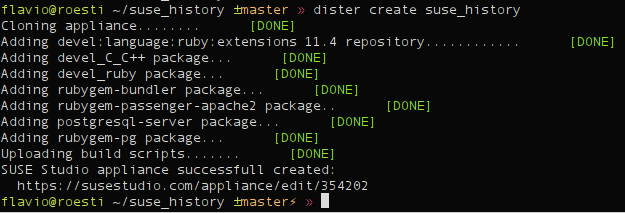
<pre><code>dister create suse_history
</code></pre>

<p><img src="http://flavio.castelli.name/images/introducing_dister/create.png"></p>

<p>As you can see dister has
already done a couple of things for you:</p>

<ul>
<li>created an appliance using latest version of openSUSE supported by SUSE Studio (you can use a different base system of course)</li>
<li>added the <em>devel:language:ruby:extensions</em> repository to the appliance: this repo contains tons of ruby packages (like <em>mod_passenger</em>)</li>
<li>installed a couple of things:

<ul>
<li><em>devel_C_C++</em> pattern: this will allow you to build native gems.</li>
<li><em>devel_ruby</em> pattern: provides ruby, rubygems and a couple of development packages needed to build native gems.</li>
<li><em>rubygem-bundler</em>: bundler is required by dister in order to handle the dependencies of your rails application.</li>
<li><em>rubygem-passenger-apache2</em>: dister uses <a href="http://www.modrails.com/">passenger</a> and apache2 to deploy your rails application.</li>
<li><em>postgresql-server</em>: dister noticed suse_history uses PostgreSQL as database, hence it automatically installs it.</li>
<li><em>rubygem-pg</em>: dister noticed suse_history uses PostgreSQL as database, hence it automatically installs the ruby&#8217;s library forPostgreSQL.</li>
</ul>
</li>
<li>uploaded a custom build script which ensures:

<ul>
<li>mod_passenger module is loaded by Apache</li>
<li>both Apache and PostgreSQL are always started at boot time.</li>
<li>all dependencies are installed: this is done only during the first boot using bundler.</li>
<li>the database user required by your rails app is created. This is done only during the first boot using some SQL code.</li>
<li>the database used by the appliance is properly initialized (aka <em>rails db:create db:migrate</em>). This is done only during the first boot.</li>
</ul>
</li>
</ul>


<h3>Upload your code</h3>

<p>It&#8217;s time to upload suse_history code. This is done using the following
command:</p>

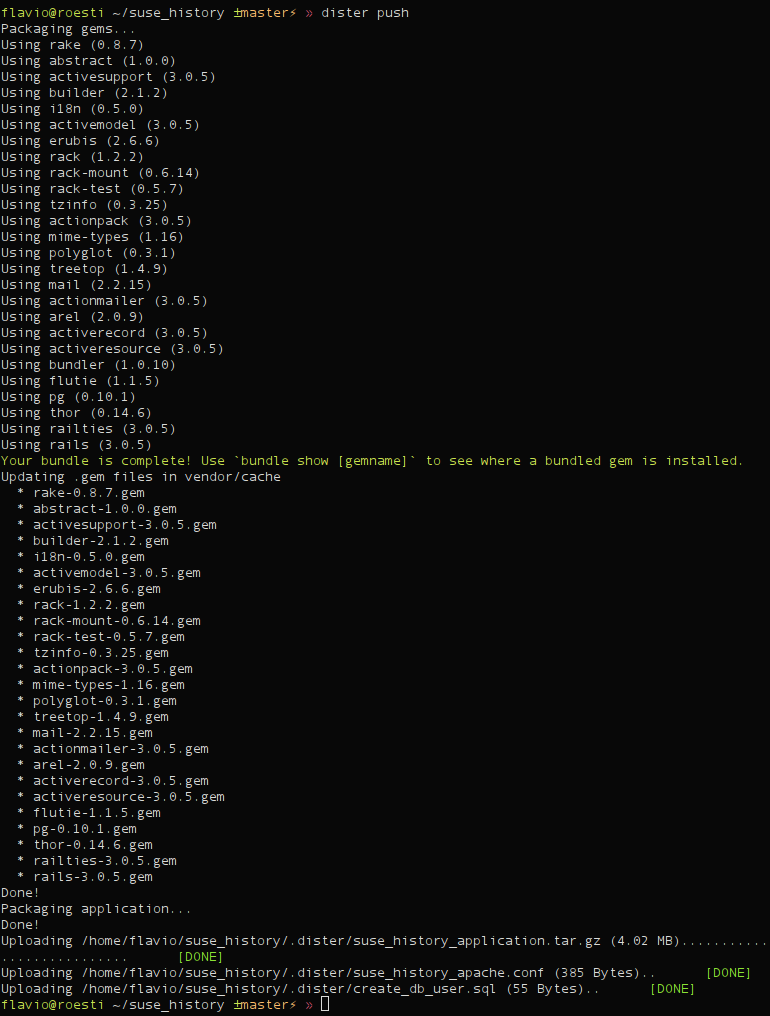
<pre><code>dister push
</code></pre>

<p><img src="http://flavio.castelli.name/images/introducing_dister/push.png"></p>

<p>As you can see dister packaged the
application source code and all its dependencies into a single archive. Then
uploaded the archive to SUSE Studio as an overlay file. Dister uploaded also
the configuration files required by Apache and by PostgreSQL setup.</p>

<h3>Build your appliance</h3>

<p>It&#8217;s build time!</p>

<pre><code>dister build
</code></pre>

<p><img src="http://flavio.castelli.name/images/introducing_dister/build.png">
The appliance has automatically being built
using the <em>raw disk</em>. You can use different formats of course.</p>

<h3>Testdrive</h3>

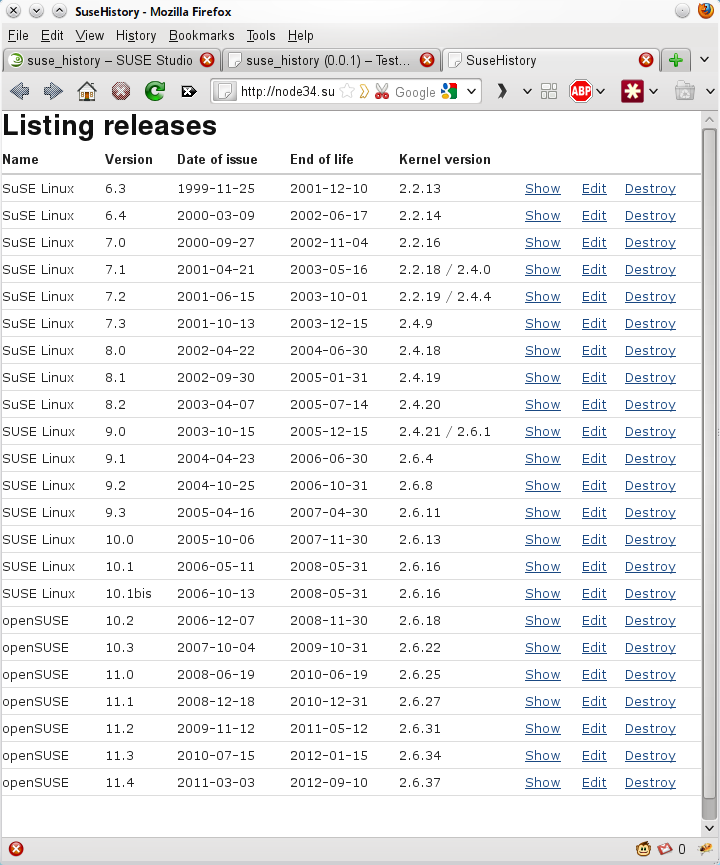
<p>Testdrive is one of the coolest features of SUSE Studio. Unfortunately dister
doesn&#8217;t support it yet. Just visit your appliance page and start testdrive
from your browser. Just enable testdrive networking and connect to your
appliance:</p>

<p><img src="http://flavio.castelli.name/images/introducing_dister/testdrive.png"></p>

<h3>Download</h3>

<p>Your appliance is working flawlessly. Download it and deploy it wherever you
want.</p>

<pre><code>dister download
</code></pre>

<h2>Current status</h2>

<p>As you can see dister handles pretty fine a simple Rails application, but
there&#8217;s still room for improvements.</p>

<p>Here&#8217;s a small list of the things on my TODO list:</p>

<ul>
<li>The dependency management should install gems using rpm packages. This would make the installation of native gems easier, right now the user has to manually add all the development libraries required by the gem. Moreover it would reduce the size of the overlay files uploaded to SUSE Studio.</li>
<li>SUSE Studio Testdrive should be supported.</li>
<li>It should be possible to deploy the SUSE Studio directly to EC2.</li>
<li>Fix bugs!</li>
</ul>


<p>Bugs and enhancements are going to be tracked
<a href="https://github.com/flavio/dister/issues">here</a>.</p>

<h2>Contribute</h2>

<p>Dister code can be found here on <a href="https://github.com/flavio/dister">github</a>,
fork it and start contributing.</p>

<p>If you are a student you can work on dister during the next <a href="http://en.opensuse.org/openSUSE:GSOC_2011_Ideas#Heroku_like_solution_for%0A_SUSE_Studio">Google Summer of
code</a>, apply now!</p>
]]></content>
  </entry>
  
  <entry>
    <title type="html"><![CDATA[Jump: a bookmarking system for the bash shell]]></title>
    <link href="http://flavio.castelli.name/2010/08/11/jump/"/>
    <updated>2010-08-11T21:29:29+02:00</updated>
    <id>http://flavio.castelli.name/2010/08/11/jump</id>
    <content type="html"><![CDATA[<p><a href="http://flavio.castelli.name/wp-content/uploads/2010/08/van-halen-%0Ajump.jpeg"></a>Let me introduce a small project I&#8217;ve been working on with a friend
of mine, <a href="http://twitter.com/gcapizzi">Giuseppe Capizzi</a>. The project is
called <strong>jump</strong> and ﻿allows you to quickly change directories in the bash
shell using bookmarks.</p>

<p>Thanks to Jump, you won&#8217;t have to type those long paths anymore.</p>

<p><img src="http://flavio.castelli.name/images/jump/van-halen-jump.jpeg"></p>

<p>You can find jump&#8217;s source code, detailed documentation and installation
instructions <a href="http://github.com/flavio/jump">here</a>.</p>

<p>SUSE packages can be found
<a href="http://software.opensuse.org/search?baseproject=ALL&amp;p=1&amp;q=rubygem-%0Ajump">here</a>.</p>
]]></content>
  </entry>
  
  <entry>
    <title type="html"><![CDATA[Fast user switch plasmoid improvements]]></title>
    <link href="http://flavio.castelli.name/2010/07/23/fast-user-switch-plasmoid-improvements/"/>
    <updated>2010-07-23T23:32:31+02:00</updated>
    <id>http://flavio.castelli.name/2010/07/23/fast-user-switch-plasmoid-improvements</id>
    <content type="html"><![CDATA[<p>Just a quick note, I released a new version of the fastuserswitch plasmoid.
This new release implements all the improvements suggested by the users plus
some minor fixes.</p>

<p>Code can be downloaded from <a href="http://gitorious.org/fast_user_switch">here</a>.
openSUSE packages are already available on the <a href="http://software.opensuse.org/search?q=plasmoid-%0Afastuserswitch&amp;baseproject=ALL&amp;lang=en&amp;exclude_debug=true">build
service</a>.</p>

<p>These are some screenshots illustrating fastuserswitch&#8217;s new features.</p>

<p><img src="http://flavio.castelli.name/images/fast_user_switch/fastuserswitch011.png">
<img src="http://flavio.castelli.name/images/fast_user_switch/fastuserswitch021.png">
<img src="http://flavio.castelli.name/images/fast_user_switch/fastuserswitch03.png"></p>
]]></content>
  </entry>
  
  <entry>
    <title type="html"><![CDATA[Fast user switch plasmoid]]></title>
    <link href="http://flavio.castelli.name/2010/07/15/fast-user-switch-plasmoid/"/>
    <updated>2010-07-15T07:23:11+02:00</updated>
    <id>http://flavio.castelli.name/2010/07/15/fast-user-switch-plasmoid</id>
    <content type="html"><![CDATA[<p>Last week my mother in law started to share her Linux laptop with my wife.
Suddenly my wife asked me how she could switch from one user session to
another. She was looking for something similar to <a href="http://bit.ly/auzc56">OS X fast user
switch</a> feature but she couldn&#8217;t find it. In fact there
wasn&#8217;t a fast and easy way to switch between users&#8217; sessions with KDE,
until&#8230; now :)</p>

<p>Let me introduce my first plasmoid: the fast user switch plasmoid. It&#8217;s a
simple icon in the panel that allows users to swich to another open session or
to open a new login page. Here you can see the mandatory screenshots.</p>

<p><img src="http://flavio.castelli.name/images/fast_user_switch/fastuserswitch02.png">
<img src="http://flavio.castelli.name/images/fast_user_switch/fastuserswitch01.png"></p>

<p>You can find the source code
<a href="http://gitorious.org/fast_user_switch#more">here</a>. Binary packages for
openSUSE are already available on the <a href="http://software.opensuse.org/search?q=plasmoid-%0Afastuserswitch&amp;baseproject=ALL&amp;lang=en&amp;exclude_debug=true">build
service</a>.</p>

<h2>One last thought about KDM</h2>

<p>I think that KDM should allow to switch back to an already open session in a
more transparent way. Right now if an user has already one session open, he
goes back to the login screen and enters his credentials a <strong>new </strong> session is
started. I think that most users would expect to be switched back to their
already running session. Starting a new session is just confusing for them.</p>
]]></content>
  </entry>
  
  <entry>
    <title type="html"><![CDATA[How to run a single rails unit test]]></title>
    <link href="http://flavio.castelli.name/2010/05/28/rails_execute_single_test/"/>
    <updated>2010-05-28T15:57:57+02:00</updated>
    <id>http://flavio.castelli.name/2010/05/28/rails_execute_single_test</id>
    <content type="html"><![CDATA[<p>This post explains how to execute a single unit test (or even a single test
method) instead of running the complete unit test suite.</p>

<p>In order to run the unit tests of your rails application, basically you have
these official possibilities:</p>

<ul>
<li><code>rake test</code>: runs all unit, functional and integration tests.</li>
<li><code>rake test:units</code>: runs all the unit tests.</li>
<li><code>rake test:functionals</code>: runs all the functional tests.</li>
<li><code>rake test:integration</code>: runs all the integration tests.
Each one of these commands requires some time and they are not the best
solution while developing a new feature or fixing a bug. In this circumstance
we just want to have a quick feedback from the unit test of the code we are
editing.</li>
</ul>


<p>Waiting for all the unit/functional tests to complete decreases our
productivity, what we need is to execute just a single unit test. Fortunately
there are different solutions for this problem, let&#8217;s go through them.</p>

<h2>The easy approach: use your favorite IDE</h2>

<p>Most of the IDE supporting ruby allow you to run a single unit test. If you
are using Netbeans running a single unit test is really easy:</p>

<ul>
<li>make sure the editor if showing the file you want to test or the file containing its unit tests</li>
<li>Hit <em>Ctrl+Shift+F6</em> or click on the following menu entry: <em>Debug->Debug Test File</em>
Two new windows will be opened: one will contain the output produced by your
unit test, the other one will show the results of the unit test.</li>
</ul>


<p>As you will notice the summary window contains also some useful information
like the:</p>

<ul>
<li>hyper links to the exact location of the code that produced the error/failure.</li>
<li>execution time required by each one of the test methods.
As you will experience it will be like &#8220;compiling&#8221; your ruby code.</li>
</ul>


<h2>From the console</h2>

<p>If you are not using Netbeans you can always rely on some command line tools.</p>

<h3>No additional tools</h3>

<p>These &#8220;tricks&#8221; don&#8217;t require additional gems, hence they will work out of the
box.</p>

<p>The first solution is to call this rake task:</p>

<pre><code>rake test TEST=path_to_test_file
</code></pre>

<p>So the final command should look like</p>

<pre><code>rake test TEST=test/unit/invitation_test.rb
</code></pre>

<p>Unfortunately on my machine this command repeats the same test three times, I
hope you won&#8217;t have the same weird behavior also on your systems&#8230;</p>

<p>Alternatively you can use the following command:</p>

<pre><code>ruby -I"lib:test" path_to_test_file"
</code></pre>

<p>It&#8217;s even possible to <strong>call a specific test method of your testcase</strong>:</p>

<pre><code>ruby -I"lib:test" path_to_test_file -n name_of_the_method"
</code></pre>

<p>So calling:</p>

<pre><code>ruby -I"lib:test" test/unit/invitation_test.rb - test_should_create_invitation
</code></pre>

<p>will execute <strong>only</strong> <em>InvitationTest::test_should_create_invitation</em>.</p>

<p>It&#8217;s also possible to <strong>execute only the test methods matching a regular
expression</strong>. Look at this example:</p>

<pre><code>ruby -I"lib:test" test/unit/invitation_test.rb -n /.*between.*/
</code></pre>

<p>This command will execute only the test methods matching the <em>/.<em>between.</em>/</em>
regexp.</p>

<h3>Using the single_test gem</h3>

<p>If you want to avoid the awful syntax showed in the previous paragraph there&#8217;s
a gem that can help you, it&#8217;s called
<a href="http://github.com/grosser/single_test">single_test</a>.</p>

<p>The github page contains a nice documentation, but let&#8217;s go through the most
common use cases.</p>

<p>You can install the gem as a rails plugin:</p>

<pre><code>script/plugin install git://github.com/grosser/single_test.git
</code></pre>

<p>single_test will add new rake tasks to your rails project, but <strong>won&#8217;t</strong>
override the original ones.</p>

<p>Suppose we want to execute the unit test of <em>user.rb</em>, just type the following
command:</p>

<pre><code>rake test:user
</code></pre>

<p>If you want to execute the functional test of <em>User</em> just call:</p>

<pre><code>rake test:user_c
</code></pre>

<p>Appending <em>&#8221;</em>c&#8221;_ to the class name will automatically execute its functional
test (if it exists).</p>

<p>It&#8217;s still possible to <strong>execute a specif test method</strong>:</p>

<pre><code>rake test:user_c:_test_name_
</code></pre>

<p>So calling:</p>

<pre><code>rake test:user_c:test_update_user
</code></pre>

<p>Will execute the <em>test_update_user</em> method written inside of
<em>test/functional/user_controller_test.rb</em>.</p>

<p>It&#8217;s still possible to use regexp:</p>

<pre><code>rake test:invitation:.*between.*
</code></pre>

<p>This syntax is equivalent to <code>ruby -I"lib:test" test/unit/invitation_test.rb
-n /.*between.*/</code>.</p>

<h2>Possible issues</h2>

<p>When a single unit test is run all the usual database initialization tasks are
not performed. If your code is relying on newly created migrations you will
surely have lots of errors. This is happening because the new migrations have
not been applied to the test database.</p>

<p>In order to fix these errors just execute:</p>

<pre><code>rake db:test:prepare
</code></pre>

<p>before running your unit test.</p>
]]></content>
  </entry>
  
  <entry>
    <title type="html"><![CDATA[QJson and Symbian]]></title>
    <link href="http://flavio.castelli.name/2010/03/14/qjson-symbian/"/>
    <updated>2010-03-14T00:55:51+01:00</updated>
    <id>http://flavio.castelli.name/2010/03/14/qjson-symbian</id>
    <content type="html"><![CDATA[<p>I&#8217;m really pleased to announce that latest version of QJson on master is
working on Symbian. You can find the installation instruction
<a href="http://qjson.sourceforge.net/get_it/symbian.html">here</a>.</p>

<p>Since I&#8217;m not a Symbian developer it has been a little hard for me to achieve
that. I would like to thank <a href="http://gitorious.org/~anluoma">Antti Luoma</a> for
his help.</p>

<p>There are also good news for Windows developers: now building QJson under
Windows is easier. Checkout the new <a href="http://qjson.sourceforge.net/get_it/windows.html">installation instruction
page</a>.</p>

<p>I hope this will help all the Windows developers who want to use QJson.</p>
]]></content>
  </entry>
  
  <entry>
    <title type="html"><![CDATA[QJson code moves to gitorious]]></title>
    <link href="http://flavio.castelli.name/2009/12/05/qjson-code-moves-to-gitorious/"/>
    <updated>2009-12-05T16:48:25+01:00</updated>
    <id>http://flavio.castelli.name/2009/12/05/qjson-code-moves-to-gitorious</id>
    <content type="html"><![CDATA[<p>Just a quick note: I have just moved QJson source code to
<a href="http://gitorious.org/qjson">this</a> git repository hosted by gitorious.</p>

<p>I&#8217;ll keep the code on KDE&#8217;s svn synchronized with the git repository.</p>
]]></content>
  </entry>
  
  <entry>
    <title type="html"><![CDATA[QJson: from QObject to JSON and vice-versa]]></title>
    <link href="http://flavio.castelli.name/2009/12/04/qjson-qobject-serialization-deserialization/"/>
    <updated>2009-12-04T01:07:48+01:00</updated>
    <id>http://flavio.castelli.name/2009/12/04/qjson-qobject-serialization-deserialization</id>
    <content type="html"><![CDATA[<p>Some days ago I introduced the possibility to serialize a QObject instance to
JSON. Today I&#8217;m going to show you the opposite operation: initializing a
QObject using a JSON object.</p>

<p>I refactored a bit my latest changes: I created a new class called
QObjectHelper that provides the methods required to convert a QObject instance
to a QVariantMap and vice-versa.</p>

<p>This class can be used in conjunction with the Serializer and Parser classes
to serialize and deserialize QObject instances to and from JSON.</p>

<p>Let me show a quick example, suppose the declaration of Person class looks
like this:</p>

<figure class='code'><figcaption><span>[class definition] [] </span></figcaption>
 <div class="highlight"><table><tr><td class="gutter"><pre class="line-numbers"><span class='line-number'>1</span>
<span class='line-number'>2</span>
<span class='line-number'>3</span>
<span class='line-number'>4</span>
<span class='line-number'>5</span>
<span class='line-number'>6</span>
<span class='line-number'>7</span>
<span class='line-number'>8</span>
<span class='line-number'>9</span>
<span class='line-number'>10</span>
<span class='line-number'>11</span>
<span class='line-number'>12</span>
<span class='line-number'>13</span>
<span class='line-number'>14</span>
<span class='line-number'>15</span>
<span class='line-number'>16</span>
<span class='line-number'>17</span>
<span class='line-number'>18</span>
<span class='line-number'>19</span>
<span class='line-number'>20</span>
<span class='line-number'>21</span>
<span class='line-number'>22</span>
<span class='line-number'>23</span>
<span class='line-number'>24</span>
<span class='line-number'>25</span>
<span class='line-number'>26</span>
<span class='line-number'>27</span>
</pre></td><td class='code'><pre><code class='cpp'><span class='line'><span class="k">class</span> <span class="nc">Person</span> <span class="o">:</span> <span class="k">public</span> <span class="n">QObject</span>
</span><span class='line'><span class="p">{</span>
</span><span class='line'>  <span class="n">Q_OBJECT</span>
</span><span class='line'>  <span class="n">Q_PROPERTY</span><span class="p">(</span><span class="n">QString</span> <span class="n">name</span> <span class="n">READ</span> <span class="n">name</span> <span class="n">WRITE</span> <span class="n">setName</span><span class="p">)</span>
</span><span class='line'>  <span class="n">Q_PROPERTY</span><span class="p">(</span><span class="kt">int</span> <span class="n">phoneNumber</span> <span class="n">READ</span> <span class="n">phoneNumber</span> <span class="n">WRITE</span> <span class="n">setPhoneNumber</span><span class="p">)</span>
</span><span class='line'>  <span class="n">Q_PROPERTY</span><span class="p">(</span><span class="n">Gender</span> <span class="n">gender</span> <span class="n">READ</span> <span class="n">gender</span> <span class="n">WRITE</span> <span class="n">setGender</span><span class="p">)</span>
</span><span class='line'>  <span class="n">Q_PROPERTY</span><span class="p">(</span><span class="n">QDate</span> <span class="n">dob</span> <span class="n">READ</span> <span class="n">dob</span> <span class="n">WRITE</span> <span class="n">setDob</span><span class="p">)</span>
</span><span class='line'>  <span class="n">Q_ENUMS</span><span class="p">(</span><span class="n">Gender</span><span class="p">)</span>
</span><span class='line'>
</span><span class='line'>  <span class="k">public</span><span class="o">:</span>
</span><span class='line'>    <span class="n">Person</span><span class="p">(</span><span class="n">QObject</span><span class="o">*</span> <span class="n">parent</span> <span class="o">=</span> <span class="mi">0</span><span class="p">);</span>
</span><span class='line'>    <span class="o">~</span><span class="n">Person</span><span class="p">();</span>
</span><span class='line'>    <span class="n">QString</span> <span class="n">name</span><span class="p">()</span> <span class="k">const</span><span class="p">;</span>
</span><span class='line'>    <span class="kt">void</span> <span class="n">setName</span><span class="p">(</span><span class="k">const</span> <span class="n">QString</span><span class="o">&amp;</span> <span class="n">name</span><span class="p">);</span>
</span><span class='line'>    <span class="kt">int</span> <span class="n">phoneNumber</span><span class="p">()</span> <span class="k">const</span><span class="p">;</span>
</span><span class='line'>    <span class="kt">void</span> <span class="n">setPhoneNumber</span><span class="p">(</span><span class="k">const</span> <span class="kt">int</span>  <span class="n">phoneNumber</span><span class="p">);</span>
</span><span class='line'>    <span class="k">enum</span> <span class="n">Gender</span> <span class="p">{</span><span class="n">Male</span><span class="p">,</span> <span class="n">Female</span><span class="p">};</span>
</span><span class='line'>    <span class="kt">void</span> <span class="n">setGender</span><span class="p">(</span><span class="n">Gender</span> <span class="n">gender</span><span class="p">);</span>
</span><span class='line'>    <span class="n">Gender</span> <span class="n">gender</span><span class="p">()</span> <span class="k">const</span><span class="p">;</span>
</span><span class='line'>    <span class="n">QDate</span> <span class="n">dob</span><span class="p">()</span> <span class="k">const</span><span class="p">;</span>
</span><span class='line'>    <span class="kt">void</span> <span class="n">setDob</span><span class="p">(</span><span class="k">const</span> <span class="n">QDate</span><span class="o">&amp;</span> <span class="n">dob</span><span class="p">);</span>
</span><span class='line'>  <span class="k">private</span><span class="o">:</span>
</span><span class='line'>    <span class="n">QString</span> <span class="n">m_name</span><span class="p">;</span>
</span><span class='line'>    <span class="kt">int</span> <span class="n">m_phoneNumber</span><span class="p">;</span>
</span><span class='line'>    <span class="n">Gender</span> <span class="n">m_gender</span><span class="p">;</span>
</span><span class='line'>    <span class="n">QDate</span> <span class="n">m_dob</span><span class="p">;</span>
</span><span class='line'><span class="p">};</span>
</span></code></pre></td></tr></table></div></figure>


<h3>From QObject to JSON</h3>

<p>The following code will serialize an instance of Person to JSON :</p>

<figure class='code'><figcaption><span>[From QObject to JSON] [] </span></figcaption>
 <div class="highlight"><table><tr><td class="gutter"><pre class="line-numbers"><span class='line-number'>1</span>
<span class='line-number'>2</span>
<span class='line-number'>3</span>
<span class='line-number'>4</span>
<span class='line-number'>5</span>
<span class='line-number'>6</span>
<span class='line-number'>7</span>
<span class='line-number'>8</span>
</pre></td><td class='code'><pre><code class='cpp'><span class='line'><span class="n">Person</span> <span class="n">person</span><span class="p">;</span>
</span><span class='line'><span class="n">person</span><span class="p">.</span><span class="n">setName</span><span class="p">(</span><span class="s">&quot;Flavio&quot;</span><span class="p">);</span>
</span><span class='line'><span class="n">person</span><span class="p">.</span><span class="n">setPhoneNumber</span><span class="p">(</span><span class="mi">123456</span><span class="p">);</span>
</span><span class='line'><span class="n">person</span><span class="p">.</span><span class="n">setGender</span><span class="p">(</span><span class="n">Person</span><span class="o">::</span><span class="n">Male</span><span class="p">);</span>
</span><span class='line'><span class="n">person</span><span class="p">.</span><span class="n">setDob</span><span class="p">(</span><span class="n">QDate</span><span class="p">(</span><span class="mi">1982</span><span class="p">,</span> <span class="mi">7</span><span class="p">,</span> <span class="mi">12</span><span class="p">));</span>
</span><span class='line'><span class="n">QVariantMap</span> <span class="n">variant</span> <span class="o">=</span> <span class="n">QObjectHelper</span><span class="o">::</span><span class="n">qobject2qvariant</span><span class="p">(</span><span class="o">&amp;</span><span class="n">person</span><span class="p">;);</span>
</span><span class='line'><span class="n">Serializer</span> <span class="n">serializer</span><span class="p">;</span>
</span><span class='line'><span class="n">qDebug</span><span class="p">()</span> <span class="o">&lt;&lt;</span> <span class="n">serializer</span><span class="p">.</span><span class="n">serialize</span><span class="p">(</span> <span class="n">variant</span><span class="p">);</span>
</span></code></pre></td></tr></table></div></figure>


<p>The generated output will be:</p>

<figure class='code'><figcaption><span>[JSON data] [] </span></figcaption>
 <div class="highlight"><table><tr><td class="gutter"><pre class="line-numbers"><span class='line-number'>1</span>
</pre></td><td class='code'><pre><code class='json'><span class='line'><span class="p">{</span> <span class="nt">&quot;dob&quot;</span> <span class="p">:</span> <span class="s2">&quot;1982-07-12&quot;</span><span class="p">,</span> <span class="nt">&quot;gender&quot;</span> <span class="p">:</span> <span class="mi">0</span><span class="p">,</span> <span class="nt">&quot;name&quot;</span> <span class="p">:</span> <span class="s2">&quot;Flavio&quot;</span><span class="p">,</span> <span class="nt">&quot;phoneNumber&quot;</span> <span class="p">:</span> <span class="mi">123456</span> <span class="p">}</span>
</span></code></pre></td></tr></table></div></figure>


<h3>From JSON to QObject</h3>

<p>Suppose you have the following JSON data stored into a QString:</p>

<figure class='code'><figcaption><span>[JSON data] [] </span></figcaption>
 <div class="highlight"><table><tr><td class="gutter"><pre class="line-numbers"><span class='line-number'>1</span>
</pre></td><td class='code'><pre><code class='json'><span class='line'><span class="p">{</span> <span class="nt">&quot;dob&quot;</span> <span class="p">:</span> <span class="s2">&quot;1982-07-12&quot;</span><span class="p">,</span> <span class="nt">&quot;gender&quot;</span> <span class="p">:</span> <span class="mi">0</span><span class="p">,</span> <span class="nt">&quot;name&quot;</span> <span class="p">:</span> <span class="s2">&quot;Flavio&quot;</span><span class="p">,</span> <span class="nt">&quot;phoneNumber&quot;</span> <span class="p">:</span> <span class="mi">123456</span> <span class="p">}</span>
</span></code></pre></td></tr></table></div></figure>


<p>The following code will initialize an already allocated instance of Person
using the JSON values:</p>

<figure class='code'><figcaption><span>[From JSON to QObject] [] </span></figcaption>
 <div class="highlight"><table><tr><td class="gutter"><pre class="line-numbers"><span class='line-number'>1</span>
<span class='line-number'>2</span>
<span class='line-number'>3</span>
<span class='line-number'>4</span>
</pre></td><td class='code'><pre><code class='cpp'><span class='line'><span class="n">Parser</span> <span class="n">parser</span><span class="p">;</span>
</span><span class='line'><span class="n">QVariant</span> <span class="n">variant</span> <span class="o">=</span> <span class="n">parser</span><span class="p">.</span><span class="n">parse</span><span class="p">(</span><span class="n">json</span><span class="p">);</span>
</span><span class='line'><span class="n">Person</span> <span class="n">person</span><span class="p">;</span>
</span><span class='line'><span class="n">QObjectHelper</span><span class="o">::</span><span class="n">qvariant2qobject</span><span class="p">(</span><span class="n">variant</span><span class="p">.</span><span class="n">toMap</span><span class="p">(),</span> <span class="o">&amp;</span><span class="n">person</span><span class="p">;);</span>
</span></code></pre></td></tr></table></div></figure>


<h3>A new release</h3>

<p>These changes have been included inside the new release of QJson: 0.7.0.</p>

<p>Packages for openSUSE are building right now.</p>
]]></content>
  </entry>
  
  <entry>
    <title type="html"><![CDATA[QJson: easier serialization of QObject instances to JSON]]></title>
    <link href="http://flavio.castelli.name/2009/11/30/qjson-easier-serialization-of-qobject-instances-to-json/"/>
    <updated>2009-11-30T20:20:58+01:00</updated>
    <id>http://flavio.castelli.name/2009/11/30/qjson-easier-serialization-of-qobject-instances-to-json</id>
    <content type="html"><![CDATA[<p>I have just committed into trunk a couple of changes that make easier to
serialize a QObject instance to JSON.</p>

<p>This solution relies on the awesome <a href="http://doc.trolltech.com/latest/properties.html">Qt&#8217;s property system</a>.</p>

<p>Suppose the declaration of Person class looks like this:</p>

<figure class='code'><figcaption><span>[class definition] [] </span></figcaption>
 <div class="highlight"><table><tr><td class="gutter"><pre class="line-numbers"><span class='line-number'>1</span>
<span class='line-number'>2</span>
<span class='line-number'>3</span>
<span class='line-number'>4</span>
<span class='line-number'>5</span>
<span class='line-number'>6</span>
<span class='line-number'>7</span>
<span class='line-number'>8</span>
<span class='line-number'>9</span>
<span class='line-number'>10</span>
<span class='line-number'>11</span>
<span class='line-number'>12</span>
<span class='line-number'>13</span>
<span class='line-number'>14</span>
<span class='line-number'>15</span>
<span class='line-number'>16</span>
<span class='line-number'>17</span>
<span class='line-number'>18</span>
<span class='line-number'>19</span>
<span class='line-number'>20</span>
<span class='line-number'>21</span>
<span class='line-number'>22</span>
<span class='line-number'>23</span>
<span class='line-number'>24</span>
<span class='line-number'>25</span>
<span class='line-number'>26</span>
</pre></td><td class='code'><pre><code class='cpp'><span class='line'><span class="k">class</span> <span class="nc">Person</span> <span class="o">:</span> <span class="k">public</span> <span class="n">QObject</span>
</span><span class='line'><span class="p">{</span>
</span><span class='line'>  <span class="n">Q_OBJECT</span>
</span><span class='line'>    <span class="n">Q_PROPERTY</span><span class="p">(</span><span class="n">QString</span> <span class="n">name</span> <span class="n">READ</span> <span class="n">name</span> <span class="n">WRITE</span> <span class="n">setName</span><span class="p">)</span>
</span><span class='line'>    <span class="n">Q_PROPERTY</span><span class="p">(</span><span class="kt">int</span> <span class="n">phoneNumber</span> <span class="n">READ</span> <span class="n">phoneNumber</span> <span class="n">WRITE</span> <span class="n">setPhoneNumber</span><span class="p">)</span>
</span><span class='line'>    <span class="n">Q_PROPERTY</span><span class="p">(</span><span class="n">Gender</span> <span class="n">gender</span> <span class="n">READ</span> <span class="n">gender</span> <span class="n">WRITE</span> <span class="n">setGender</span><span class="p">)</span>
</span><span class='line'>    <span class="n">Q_PROPERTY</span><span class="p">(</span><span class="n">QDate</span> <span class="n">dob</span> <span class="n">READ</span> <span class="n">dob</span> <span class="n">WRITE</span> <span class="n">setDob</span><span class="p">)</span>
</span><span class='line'>    <span class="n">Q_ENUMS</span><span class="p">(</span><span class="n">Gender</span><span class="p">)</span>
</span><span class='line'>  <span class="k">public</span><span class="o">:</span>
</span><span class='line'>    <span class="n">Person</span><span class="p">(</span><span class="n">QObject</span><span class="o">*</span> <span class="n">parent</span> <span class="o">=</span> <span class="mi">0</span><span class="p">);</span>
</span><span class='line'>    <span class="o">~</span><span class="n">Person</span><span class="p">();</span>
</span><span class='line'>    <span class="n">QString</span> <span class="n">name</span><span class="p">()</span> <span class="k">const</span><span class="p">;</span>
</span><span class='line'>    <span class="kt">void</span> <span class="n">setName</span><span class="p">(</span><span class="k">const</span> <span class="n">QString</span><span class="o">&amp;</span> <span class="n">name</span><span class="p">);</span>
</span><span class='line'>    <span class="kt">int</span> <span class="n">phoneNumber</span><span class="p">()</span> <span class="k">const</span><span class="p">;</span>
</span><span class='line'>    <span class="kt">void</span> <span class="n">setPhoneNumber</span><span class="p">(</span><span class="k">const</span> <span class="kt">int</span>  <span class="n">phoneNumber</span><span class="p">);</span>
</span><span class='line'>    <span class="k">enum</span> <span class="n">Gender</span> <span class="p">{</span><span class="n">Male</span><span class="p">,</span> <span class="n">Female</span><span class="p">};</span>
</span><span class='line'>    <span class="kt">void</span> <span class="n">setGender</span><span class="p">(</span><span class="n">Gender</span> <span class="n">gender</span><span class="p">);</span>
</span><span class='line'>    <span class="n">Gender</span> <span class="n">gender</span><span class="p">()</span> <span class="k">const</span><span class="p">;</span>
</span><span class='line'>    <span class="n">QDate</span> <span class="n">dob</span><span class="p">()</span> <span class="k">const</span><span class="p">;</span>
</span><span class='line'>    <span class="kt">void</span> <span class="n">setDob</span><span class="p">(</span><span class="k">const</span> <span class="n">QDate</span><span class="o">&amp;</span> <span class="n">dob</span><span class="p">);</span>
</span><span class='line'>  <span class="k">private</span><span class="o">:</span>
</span><span class='line'>    <span class="n">QString</span> <span class="n">m_name</span><span class="p">;</span>
</span><span class='line'>    <span class="kt">int</span> <span class="n">m_phoneNumber</span><span class="p">;</span>
</span><span class='line'>    <span class="n">Gender</span> <span class="n">m_gender</span><span class="p">;</span>
</span><span class='line'>    <span class="n">QDate</span> <span class="n">m_dob</span><span class="p">;</span>
</span><span class='line'><span class="p">};</span>
</span></code></pre></td></tr></table></div></figure>


<p>The following code will serialize an instance of Person to JSON:</p>

<figure class='code'><figcaption><span>[Serialize to JSON] [] </span></figcaption>
 <div class="highlight"><table><tr><td class="gutter"><pre class="line-numbers"><span class='line-number'>1</span>
<span class='line-number'>2</span>
<span class='line-number'>3</span>
<span class='line-number'>4</span>
<span class='line-number'>5</span>
<span class='line-number'>6</span>
<span class='line-number'>7</span>
</pre></td><td class='code'><pre><code class='cpp'><span class='line'>    <span class="n">Person</span> <span class="n">person</span><span class="p">;</span>
</span><span class='line'>    <span class="n">person</span><span class="p">.</span><span class="n">setName</span><span class="p">(</span><span class="s">&quot;Flavio&quot;</span><span class="p">);</span>
</span><span class='line'>    <span class="n">person</span><span class="p">.</span><span class="n">setPhoneNumber</span><span class="p">(</span><span class="mi">123456</span><span class="p">);</span>
</span><span class='line'>    <span class="n">person</span><span class="p">.</span><span class="n">setGender</span><span class="p">(</span><span class="n">Person</span><span class="o">::</span><span class="n">Male</span><span class="p">);</span>
</span><span class='line'>    <span class="n">person</span><span class="p">.</span><span class="n">setDob</span><span class="p">(</span><span class="n">QDate</span><span class="p">(</span><span class="mi">1982</span><span class="p">,</span> <span class="mi">7</span><span class="p">,</span> <span class="mi">12</span><span class="p">));</span>
</span><span class='line'>    <span class="n">Serializer</span> <span class="n">serializer</span><span class="p">;</span>
</span><span class='line'>    <span class="n">qDebug</span><span class="p">()</span> <span class="o">&lt;&lt;</span> <span class="n">serializer</span><span class="p">.</span><span class="n">serialize</span><span class="p">(</span> <span class="o">&amp;</span><span class="n">person</span><span class="p">;);</span>
</span></code></pre></td></tr></table></div></figure>


<p>The generated output will be:</p>

<figure class='code'><figcaption><span>[JSON data] [] </span></figcaption>
 <div class="highlight"><table><tr><td class="gutter"><pre class="line-numbers"><span class='line-number'>1</span>
</pre></td><td class='code'><pre><code class='json'><span class='line'>    <span class="p">{</span> <span class="nt">&quot;dob&quot;</span> <span class="p">:</span> <span class="s2">&quot;1982-07-12&quot;</span><span class="p">,</span> <span class="nt">&quot;gender&quot;</span> <span class="p">:</span> <span class="mi">0</span><span class="p">,</span> <span class="nt">&quot;name&quot;</span> <span class="p">:</span> <span class="s2">&quot;Flavio&quot;</span><span class="p">,</span> <span class="nt">&quot;phoneNumber&quot;</span> <span class="p">:</span> <span class="mi">123456</span> <span class="p">}</span>
</span></code></pre></td></tr></table></div></figure>


<p>I hope you will find this new feature useful. I&#8217;m also considering to create a
similar method inside the Parser class.</p>

<p>As usual suggestions are welcome.</p>
]]></content>
  </entry>
  
  <entry>
    <title type="html"><![CDATA[kaveau updates]]></title>
    <link href="http://flavio.castelli.name/2009/09/14/kaveau-updates/"/>
    <updated>2009-09-14T23:38:54+02:00</updated>
    <id>http://flavio.castelli.name/2009/09/14/kaveau-updates</id>
    <content type="html"><![CDATA[<p>Some weeks have passed since the announcement of kaveau. I&#8217;m really proud and
happy about this project because I received a lot of positive feedback
messages and it has been chosen as one of the best Hackweek&#8217;s projects.</p>

<p>In the meantime I kept working on kaveau, so let me show you what has changed:</p>

<ul>
<li><a href="http://rdiff-backup.nongnu.org/">rdiff-backup</a> has been replaced by <a href="http://www.samba.org/rsync/">rsync</a>.</li>
<li>the setup wizard has been improved according to the feedback messages I received.</li>
<li>old backups are now automatically removed.</li>
<li>the code has been refactored a lot.</li>
</ul>


<h3>The switch to rsync</h3>

<p>Previously kaveau used rdiff-backup as backup back-end. rdiff-backup is a
great program but unfortunately it relies on the outdated
<a href="http://librsync.sourceforge.net/">librsync</a> library. The latest release of
librsync is dated 2004. It has a couple of serious bugs still open and, while
rsync has reached version three, this library is still stuck at version one.</p>

<p>These are the reasons of the switch from rdiff-backup to rsync. This choice
breaks the compatibility with the previous backups but it introduces a lot of
advantages. One of the most important improvements brought by the adoption of
rsync is an easier restore procedure: now <strong>all</strong> the backups can be accessed
using a standard file manager, while previously rdiff-backup was needed to
access the old backups.</p>

<h4>Backup directory structure</h4>

<p>On the backup device everything is saved under the
<em>kaveau</em>/<em>hostname</em>/<em>username</em> path.</p>

<p>The directory will have a similar structure:</p>

<pre><code>drwxr-xr-x 3 flavio users 4096 2009-09-12 18:50 2009-09-12T18:50:19
drwxr-xr-x 3 flavio users 4096 2009-09-14 23:07 2009-09-14T23:07:46
drwxr-xr-x 3 flavio users 4096 2009-09-14 23:30 2009-09-14T23:30:36
lrwxrwxrwx 1 flavio users   19 2009-09-14 23:30 current -&gt; 2009-09-14T23:30:36
</code></pre>

<p>As you can see there&#8217;s one directory per backup, plus a symlink called
<em>current</em> pointing to the latest backup.</p>

<h3>Old backup deletion</h3>

<p>Nowadays big external storage devices are pretty cheap, but it&#8217;s always good
to save some disk space. Now kaveau keeps:</p>

<ul>
<li>hourly backups for the past 24 hours.</li>
<li>daily backups for the past month.</li>
<li>weekly backups until the external disk is full.
Thanks to hard links&#8217; magic, old backups can be deleted without causing
damages to the other ones.</li>
</ul>


<h3>Plans for the future</h3>

<p>Before starting to work on the restore user interface I will spend some time
figuring out how to add support for network devices.</p>

<p>A lot of users requested this feature, hence I want to make them happy :) .</p>

<p>I&#8217;m planning to use <a href="http://avahi.org/">avahi</a> to discover network shares
(nfs, samba) or network machines running ssh and use them as backup devices.
Honestly, I want to achieve something similar to
<a href="http://www.apple.com/timecapsule/">Apple&#8217;s time capsule</a>.</p>

<p>As usual, feedback messages are really appreciated.</p>
]]></content>
  </entry>
  
  <entry>
    <title type="html"><![CDATA[Using QJson under Windows]]></title>
    <link href="http://flavio.castelli.name/2009/09/04/using-qjson-under-windows/"/>
    <updated>2009-09-04T13:44:42+02:00</updated>
    <id>http://flavio.castelli.name/2009/09/04/using-qjson-under-windows</id>
    <content type="html"><![CDATA[<p>Recently lots of people asked me how to build QJson under Windows. Most of
them reported build/link errors, so I decided to try personally.</p>

<p>The good news is that QJson can be successfully built under Window, I can show
you proof ;)</p>

<p><img src="http://flavio.castelli.name/images/qjson/qjson_windows_1.png">
<img src="http://flavio.castelli.name/images/qjson/qjson_windows_2.png"></p>

<p>I have written the build instructions on QJson website: just take a look
<a href="http://qjson.sourceforge.net/download.html#windows">here</a>.</p>

<p>One last note: if you have problems with QJson please subscribe to the
<a href="https://lists.sourceforge.net/lists/listinfo/qjson-%0Adevel">developer mailing list</a> and post a message.</p>
]]></content>
  </entry>
  
  <entry>
    <title type="html"><![CDATA[kaveau: easy and integrated backups solution for KDE]]></title>
    <link href="http://flavio.castelli.name/2009/07/28/kaveau-easy-integrated-backup-solution-kde/"/>
    <updated>2009-07-28T09:47:05+02:00</updated>
    <id>http://flavio.castelli.name/2009/07/28/kaveau-easy-integrated-backup-solution-kde</id>
    <content type="html"><![CDATA[<p>During the last week I had the possibility to work on anything I wanted,
Novell&#8217;s hackweek is so cool :)</p>

<p>I decided to dedicate myself to an idea that has been obsessing me since a
long time. Last December my brand new hard disk suddenly died, making
impossible to recover anything. Fortunately I had just synchronized the most
important documents between my workstation and my laptop, so I didn&#8217;t lose
anything important. This incident make me realize that I should perform
backups regularly and I immediately started looking for a good solution.</p>

<p>Personally I think that doing backups is pretty boring so I wanted something
damned easy to setup and use. Something that once configured runs in the
background and does the dirty job without bothering you. Let&#8217;s face the truth:
I wanted Apple&#8217;s Time Machine for KDE.</p>

<p>After some searches I realized that nothing was fitting my requirements and I
decided to create something new: <em>kaveau</em>.</p>

<h3>What is kaveau?</h3>

<p>Kaveau is a backup program that makes backup easy for the average user.</p>

<p>As you will see while coding/planning kaveau I made some assumptions and so
only few things are configurable. I really think that sometimes <a href="http://en.wikipedia.org/wiki/Minimalism"><em>&#8220;less is
more&#8221;</em></a>.</p>

<h3>What does kaveau?</h3>

<p>Current features:</p>

<ul>
<li>it performs backups to an external storage device: I don&#8217;t think it will ever store backup data on a remote host. If you want to do that just use some good project like <a href="http://backuppc.sourceforge.net/">Backup pc</a>.</li>
<li>it backs up the complete home directory of the user: storage is cheap and average users (like me) keep everything inside their home directory ( but it&#8217;s possible to exclude some directories from the backup).</li>
<li>it performs incremental backups.</li>
<li>the backup data are neither compressed nor stored in fancy formats: in this way you can plug your external disk into another machine and access your data without additional work.</li>
<li>backups are performed automatically every hour (of course only if your external disk is plugged).</li>
<li>notification messages are shown if your backup is older that a week.
More enhancements are coming&#8230;</li>
</ul>


<h3>What technologies does it use?</h3>

<p>Backups are performed using <a href="http://rdiff-backup.nongnu.org/">rdiff-backup</a>
because it&#8217;s damned easy to use, well tested (it&#8217;s used also in production
environments) and packaged by all distributions.</p>

<p>The awesome <a href="http://solid.kde.org/">solid</a> library is used for interacting
with the external disks is super easy.</p>

<h3>Status of kaveau</h3>

<p>I have been working on kaveau just for five days, so <strong>there&#8217;s still a lot of
work to do</strong>.</p>

<p>A screenshot tour will give you the right idea of its status.</p>

<h4>First run - external storage device attached</h4>

<p><img src="http://flavio.castelli.name/images/kaveau/sf1.png"></p>

<h4>Backup wizard - page 1</h4>

<p><img src="http://flavio.castelli.name/images/kaveau/sf3.png"></p>

<h4>Backup wizard - page 2</h4>

<p><img src="http://flavio.castelli.name/images/kaveau/sf4.png"></p>

<h4>Backup wizard - final page</h4>

<p><img src="http://flavio.castelli.name/images/kaveau/sf5.png"></p>

<h4>Backup operation in progress</h4>

<p><img src="http://flavio.castelli.name/images/kaveau/sf6.png"></p>

<h4>Backup completed</h4>

<p><img src="http://flavio.castelli.name/images/kaveau/sf7.png"></p>

<p>Right now the code is available on
<a href="http://github.com/flavio/kaveau/tree/master">this</a> git repository but I don&#8217;t
recommend you to try it (unless you want to find and fix bugs ;) ).</p>

<p>I would really appreciate:</p>

<ul>
<li>feedback about the user interface (right now it looks too much like Time Machine).</li>
<li>icons: it would be great to have a desktop icon and some system tray icons (contact me for more details).</li>
<li>new code, bug fixes, code reviews, hints,&#8230;</li>
</ul>

]]></content>
  </entry>
  
  <entry>
    <title type="html"><![CDATA[New QJson release]]></title>
    <link href="http://flavio.castelli.name/2009/07/23/qjson_0-6-0_release/"/>
    <updated>2009-07-23T11:51:30+02:00</updated>
    <id>http://flavio.castelli.name/2009/07/23/qjson_0-6-0_release</id>
    <content type="html"><![CDATA[<p>Gran Canaria Desktop Summit has been great and really productive. I had the
pleasure to meet people interested in QJson, chat with them but also hack with
them.</p>

<p>In fact we hacked a lot, doing lots of changes to QJson:</p>

<ul>
<li>the API has been cleaned, now it can be considered stable</li>
<li>unicode support has been completely rewritten</li>
<li>it&#8217;s now possible to convert QVariant objects into JSON ones</li>
</ul>


<p>So it&#8217;s with a great pleasure that I announce the release of QJson 0.6.0.</p>

<p>Beware, since the API has been changed your application will probably break.
I&#8217;m really sorry about that, but I guarantee it won&#8217;t happen in the future (as
I said both API and ABI interfaces can now be considered stable).</p>

<p><a href="http://qjson.sourceforge.net">QJson web site</a> has been updated, reflecting
all the changes made to the library. openSUSE packages has been moved from my
home repo to <a href="http://download.opensuse.org/repositories/KDE:/Qt/">KDE:Qt</a> one.</p>

<p>One last note, if you have problems with QJson please contact me using the
qjson-devel mailing list. You can subscribe
<a href="https://sourceforge.net/mailarchive/forum.php?forum_name=qjson-devel">here</a>.</p>
]]></content>
  </entry>
  
  <entry>
    <title type="html"><![CDATA[QJson at Gran Canaria Desktop Summit]]></title>
    <link href="http://flavio.castelli.name/2009/06/30/qjson_desktop_summi/"/>
    <updated>2009-06-30T19:46:38+02:00</updated>
    <id>http://flavio.castelli.name/2009/06/30/qjson_desktop_summi</id>
    <content type="html"><![CDATA[<p>Now that I have booked both the flights and the hotel it&#8217;s official: I&#8217;ll
attend the <a href="http://www.grancanariadesktopsummit.org/">Gran Canaria Desktop Summit</a>.</p>

<p>On Thursday 9th July I&#8217;ll give a BoF about
<a href="http://qjson.sourceforge.net">QJson</a>.</p>

<p>During the talk I will show:</p>

<ul>
<li>the advantages brought by QJson.</li>
<li>the usage of QJson.</li>
<li>some real programs using QJson.</li>
</ul>


<p>See you soon!</p>

<p><img src="http://flavio.castelli.name/images/gran_canaria_desktop_summit/badge.png"></p>
]]></content>
  </entry>
  
  <entry>
    <title type="html"><![CDATA[rockmarble: see who is going to rock in your town]]></title>
    <link href="http://flavio.castelli.name/2009/04/07/rockmarble-rock-in-your-town/"/>
    <updated>2009-04-07T17:40:45+02:00</updated>
    <id>http://flavio.castelli.name/2009/04/07/rockmarble-rock-in-your-town</id>
    <content type="html"><![CDATA[<p>During the last weekend I hacked a bit on rockmarble and I added a new
feature: retrieve all the events happening in a certain city.</p>

<p>As usual data is provided by last.fm, which should return also the events
<em>&#8220;near&#8221; </em>the specified city (don&#8217;t ask me to define a value for <em>near</em> :) ).</p>

<p>I have created new openSUSE packages, this time everything should work fine.
Just make sure to remove all <a href="http://qjson.sourceforge.net/">qjson</a> packages
before installing this release (in fact all the previous problems were due to
packaging errors of qjson, now I have created new packages called libqjson0).</p>

<p>Packages are available for openSUSE 11.0, 11.1 and Factory (both for i586 and
x86_64 architectures).</p>

<p>One last news: rockmarble has also a new
<a href="http://rockmarble.sourceforge.net">site</a>, something slightly better than
github wiki ;)</p>

<p><a href="http://cloud.github.com/downloads/flavio%0A/rockmarble/rockmarble.ymp"><img src="http://flavio.castelli.name/images/rockmarble/rockmarble_1click.png" alt="" /></a></p>
]]></content>
  </entry>
  
  <entry>
    <title type="html"><![CDATA[rockmarble: how to follow your favourite artists tour with Marble]]></title>
    <link href="http://flavio.castelli.name/2009/04/02/rockmarble-follow-artists-tours-with-marble/"/>
    <updated>2009-04-02T08:51:43+02:00</updated>
    <id>http://flavio.castelli.name/2009/04/02/rockmarble-follow-artists-tours-with-marble</id>
    <content type="html"><![CDATA[<p>During the last weekend I wanted to have some fun with
<a href="http://qjson.sourceforge.net/">QJson</a>. So I came out with this idea: retrieve
from <a href="http://www.last.fm/home">last.fm</a> the tour dates of my favourite artists
and display the locations using <a href="http://edu.kde.org/marble/">Marble</a>.</p>

<p>After some hacking I created this small application: <em>rockmarble</em>&#8230;</p>

<p><img src="http://flavio.castelli.name/images/rockmarble/flow.png"></p>

<p>If you have a last.fm account rockmarble will import your favourite artist
list. Otherwise you can add one artists at a time.</p>

<p>The tour location will be displayed inside Marble, using
<a href="http://www.openstreetmap.org/">openstreetmap</a>.</p>

<h2>Requirements</h2>

<p>In order to build/run it you will need:</p>

<ul>
<li><a href="http://www.qtsoftware.com/downloads">Qt4</a></li>
<li><a href="http://edu.kde.org/marble/">marble</a></li>
<li><a href="http://qjson.sourceforge.net/">QJson</a></li>
</ul>


<h2>Installation</h2>

<p>You can grab the source code of rockmarble
<a href="http://github.com/flavio/rockmarble/tree/master">here</a>.</p>

<p>If you are an openSUSE user you can use 1click install:</p>

<p><a href="http://cloud.github.com/downloads/flavio%0A/rockmarble/rockmarble.ymp"><img src="http://flavio.castelli.name/images/rockmarble/rockmarble_1click.png" alt="" /></a></p>

<h2>Issues</h2>

<h3>Geolocalization</h3>

<p>The geolocalization data are given by last.fm, so if you discover that
Metallica are going to give a concert in the middle of the Pacific Ocean
please don’t bother me :)</p>

<h3>Special names</h3>

<p>It seems that QJson doesn’t handle properly special characters. Maybe you will
some artist with a blank name. I’m going to fix this issue asap.</p>

<h2>More details</h2>

<p>Visit <a href="http://rockmarble.sourceforge.net">rockmarble website</a></p>

<h2>Future</h2>

<p>Who wants to integrate it into amarok&#8217;s context view? ;)</p>
]]></content>
  </entry>
  
  <entry>
    <title type="html"><![CDATA[QJson: a Qt-based library for mapping JSON data to QVariant objects]]></title>
    <link href="http://flavio.castelli.name/2008/11/04/qjson_qt_json_library/"/>
    <updated>2008-11-04T13:37:07+01:00</updated>
    <id>http://flavio.castelli.name/2008/11/04/qjson_qt_json_library</id>
    <content type="html"><![CDATA[<p>In order to realize a project of mine I started looking for a Qt library for
mapping JSON data to Qt objects.</p>

<p>I came over a couple of solutions but none of them made me happy. So in the
last weekend I wrote my own library : <strong>QJson</strong> The library is based on Qt
toolkit and converts JSON data to <em>QVariant</em> instances. JSON arrays will be
mapped to <em>QVariantList</em> instances, while JSON&#8217;s objects will be mapped to
<em>QVariantMap</em>. The JSON parser is generated with Bison, while the scanner has
been coded by me.</p>

<h3>Usage</h3>

<p>Converting JSON&#8217;s data to <em>QVariant</em> instance is really simple:</p>

<figure class='code'><figcaption><span>[] [] </span></figcaption>
 <div class="highlight"><table><tr><td class="gutter"><pre class="line-numbers"><span class='line-number'>1</span>
<span class='line-number'>2</span>
<span class='line-number'>3</span>
<span class='line-number'>4</span>
<span class='line-number'>5</span>
</pre></td><td class='code'><pre><code class='cpp'><span class='line'><span class="c1">// create a JSonDriver instance</span>
</span><span class='line'><span class="n">JSonDriver</span> <span class="n">driver</span><span class="p">;</span>
</span><span class='line'><span class="kt">bool</span> <span class="n">ok</span><span class="p">;</span>
</span><span class='line'><span class="c1">// json is a QString containing the data to convert</span>
</span><span class='line'><span class="n">QVariant</span> <span class="n">result</span> <span class="o">=</span> <span class="n">driver</span><span class="p">.</span><span class="n">parse</span> <span class="p">(</span><span class="n">json</span><span class="p">,</span> <span class="o">&amp;</span><span class="n">ok</span><span class="p">);</span>
</span></code></pre></td></tr></table></div></figure>


<p>Suppose you&#8217;re going to convert this JSON data:</p>

<figure class='code'><figcaption><span>[JSON data] [] </span></figcaption>
 <div class="highlight"><table><tr><td class="gutter"><pre class="line-numbers"><span class='line-number'>1</span>
<span class='line-number'>2</span>
</pre></td><td class='code'><pre><code class='json'><span class='line'><span class="p">{</span> <span class="nt">&quot;encoding&quot;</span> <span class="p">:</span> <span class="s2">&quot;UTF-8&quot;</span><span class="p">,</span> <span class="nt">&quot;plug-ins&quot;</span> <span class="p">:</span> <span class="p">[</span> <span class="s2">&quot;python&quot;</span><span class="p">,</span> <span class="s2">&quot;c++&quot;</span><span class="p">,</span> <span class="s2">&quot;ruby&quot;</span> <span class="p">],</span>
</span><span class='line'>  <span class="nt">&quot;indent&quot;</span> <span class="p">:</span> <span class="p">{</span> <span class="nt">&quot;length&quot;</span> <span class="p">:</span> <span class="mi">3</span><span class="p">,</span> <span class="nt">&quot;use_space&quot;</span> <span class="p">:</span> <span class="kc">true</span> <span class="p">}</span> <span class="p">}</span>
</span></code></pre></td></tr></table></div></figure>


<p>The following code would convert the JSON data and parse it:</p>

<figure class='code'><figcaption><span>[] [] </span></figcaption>
 <div class="highlight"><table><tr><td class="gutter"><pre class="line-numbers"><span class='line-number'>1</span>
<span class='line-number'>2</span>
<span class='line-number'>3</span>
<span class='line-number'>4</span>
<span class='line-number'>5</span>
<span class='line-number'>6</span>
<span class='line-number'>7</span>
<span class='line-number'>8</span>
<span class='line-number'>9</span>
<span class='line-number'>10</span>
<span class='line-number'>11</span>
<span class='line-number'>12</span>
<span class='line-number'>13</span>
<span class='line-number'>14</span>
<span class='line-number'>15</span>
</pre></td><td class='code'><pre><code class='cpp'><span class='line'><span class="n">JSonDriver</span> <span class="n">driver</span><span class="p">;</span>
</span><span class='line'><span class="kt">bool</span> <span class="n">ok</span><span class="p">;</span>
</span><span class='line'><span class="n">QVariantMap</span> <span class="n">result</span> <span class="o">=</span> <span class="n">driver</span><span class="p">.</span><span class="n">parse</span> <span class="p">(</span><span class="n">json</span><span class="p">,</span> <span class="o">&amp;</span><span class="n">ok</span><span class="p">).</span><span class="n">toMap</span><span class="p">();</span>
</span><span class='line'><span class="k">if</span> <span class="p">(</span><span class="o">!</span><span class="n">ok</span><span class="p">)</span> <span class="p">{</span>
</span><span class='line'>  <span class="n">qFatal</span><span class="p">(</span><span class="s">&quot;An error occured during parsing&quot;</span><span class="p">);</span>
</span><span class='line'>  <span class="n">exit</span> <span class="p">(</span><span class="mi">1</span><span class="p">);</span>
</span><span class='line'><span class="p">}</span>
</span><span class='line'><span class="n">qDebug</span><span class="p">()</span> <span class="o">&lt;&lt;</span> <span class="s">&quot;encoding:&quot;</span> <span class="o">&lt;&lt;</span> <span class="n">result</span><span class="p">[</span><span class="s">&quot;encoding&quot;</span><span class="p">].</span><span class="n">toString</span><span class="p">();</span>
</span><span class='line'><span class="n">qDebug</span><span class="p">()</span> <span class="o">&lt;&lt;</span> <span class="s">&quot;plugins:&quot;</span><span class="p">;</span>
</span><span class='line'><span class="n">foreach</span> <span class="p">(</span><span class="n">QVariant</span> <span class="n">plugin</span><span class="p">,</span> <span class="n">result</span><span class="p">[</span><span class="s">&quot;plug-ins&quot;</span><span class="p">].</span><span class="n">toList</span><span class="p">())</span> <span class="p">{</span>
</span><span class='line'>  <span class="n">qDebug</span><span class="p">()</span> <span class="o">&lt;&lt;</span> <span class="s">&quot;</span><span class="se">\t</span><span class="s">-&quot;</span> <span class="o">&lt;&lt;</span> <span class="n">plugin</span><span class="p">.</span><span class="n">toString</span><span class="p">();</span>
</span><span class='line'><span class="p">}</span>
</span><span class='line'><span class="n">QVariantMap</span> <span class="n">nestedMap</span> <span class="o">=</span> <span class="n">result</span><span class="p">[</span><span class="s">&quot;indent&quot;</span><span class="p">].</span><span class="n">toMap</span><span class="p">();</span>
</span><span class='line'><span class="n">qDebug</span><span class="p">()</span> <span class="o">&lt;&lt;</span> <span class="s">&quot;length:&quot;</span> <span class="o">&lt;&lt;</span> <span class="n">nestedMap</span><span class="p">[</span><span class="s">&quot;length&quot;</span><span class="p">].</span><span class="n">toInt</span><span class="p">();</span>
</span><span class='line'><span class="n">qDebug</span><span class="p">()</span> <span class="o">&lt;&lt;</span> <span class="s">&quot;use_space:&quot;</span> <span class="o">&lt;&lt;</span> <span class="n">nestedMap</span><span class="p">[</span><span class="s">&quot;use_space&quot;</span><span class="p">].</span><span class="n">toBool</span><span class="p">();</span>
</span></code></pre></td></tr></table></div></figure>


<p>The output would be:</p>

<pre><code>encoding: "UTF-8" plugins: - "python" - "c++" - "ruby" length: 3 use_space: true
</code></pre>

<h3>Requirements</h3>

<p>QJson requires:</p>

<ul>
<li>cmake</li>
<li>Qt</li>
</ul>


<h3>Obtain the source</h3>

<p>Actually QJson code is hosted on KDE subversion repository. You can download
it using a svn client:</p>

<blockquote><p>svn co svn://anonsvn.kde.org/home/kde/trunk/playground/libs/qjson</p></blockquote>

<p>For more informations visit <a href="http://qjson.sourceforge.net">QJson site</a></p>
]]></content>
  </entry>
  
</feed>